

 Bahasa Indonesia
Kembali
· 2 menit baca
Wireframes, dots and blend modes
A drawable takes a wireframe, a dot on every vertex and a depth test switch, and a 2D one a blend mode.
- Dragos Balaur
A 3D or 2D drawable can draw its triangle edges and its vertices beside its surface, and a 2D one picks how it blends.
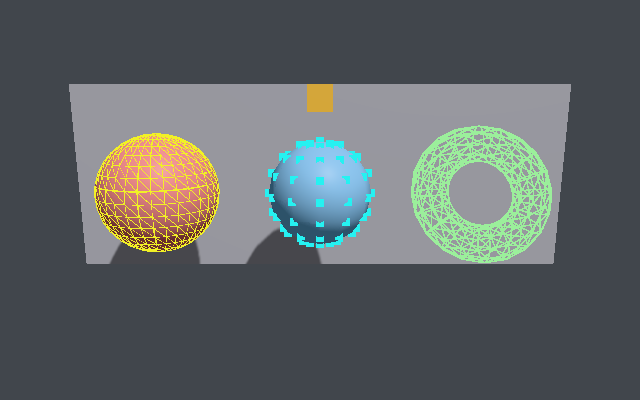
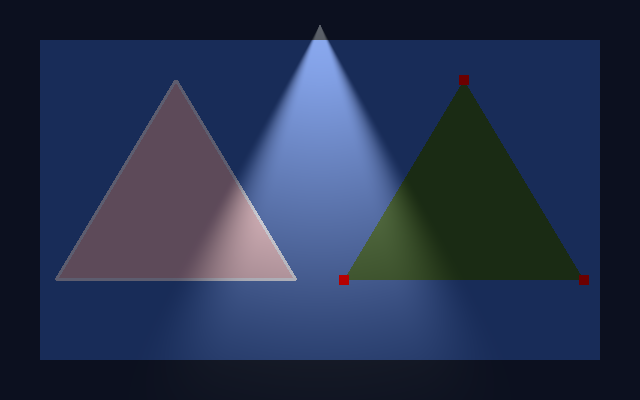
wireframe_widthdraws every triangle edge inwireframe_color, anddot_sizea dot on every vertex indot_color.screensizing counts pixels;worldthins with distance.draw_surface = falseleaves only the wireframe and the dots. A skinned mesh draws neither, and WebGL2 has no line or point pass.depth_test = falsedraws a node over everything drawn before it, as the box behind the wall shows.receive_shadows = falselights it as if nothing stood in the way.blend_modeon a 2D drawable isalpha,premultiplied,add,multiply,screenoropaque;autofollows the texture.- A
light2dofkind = "spot"throws a cone its node's rotation aims, betweeninner_angle_degreesandouter_angle_degrees.
[nodes.shape3d]
kind = "torus"
draw_surface = false
wireframe_width = 1.5
wireframe_sizing = "screen"