For animatorsAnimate persona
Skeletal animation, 2D and 3D, inside the engine you ship with.
Bones and mesh skinning with painted weights, two-bone IK and look-at, keys in a timeline — on the rig that runs in the game, so there is no export step and no runtime to integrate.
What you get
Bones and skins
A bone is a node with a rest pose; a skin is a textured polygon with painted weights. Bend and deform images with mesh skinning, and paint the weights in the polygon tool's Weights mode.
Pose with inverse kinematics
Two-bone IK and look-at run as modifiers after the clip: drag a target and the limb follows. Key the target, not the joints.
A timeline with keys
Clips are tracks over time — position, rotation, scale, any component property — with twelve easings, step, linear and cubic interpolation, and method tracks that call your script at a time.
3D rigs from glTF
balaur import model.glb writes the joints, the mesh and the animations as TOML the editor edits; GPU skinning draws the result.
How it works
A clip is a file, or lives in the scene. Either way it is TOML you can read, diff and review.
A clip is a length, what to do with time past it — none, loop or pingpong — and a list of tracks. Each track addresses a property by path and keys it; a method track calls a script function at a time. Clips live in their own file or inline in the node, and a library file holds several under [clips.<name>].
Skeletons are nodes: a bone is any node carrying bone2d or bone3d, so the tree is the rig and the same clip keys bones by path.
type = "animation_clip"

[clips.patrol]
length = 4.0
loop = "pingpong"

[[clips.patrol.tracks]]
property = "position"      # position | rotation_euler | rotation | scale | <component>/<property>
interp = "linear"          # step | linear | cubic
keys = [
{ t = 0.0, value = [-2.5, 0.25, -2.0] },
{ t = 4.0, value = [-2.5, 0.25, 2.0], ease = "in_out_sine" },
]

[[clips.patrol.tracks]]
keys = [{ t = 4.0, call = "on_reached_end" }]   # a method track
In the editor
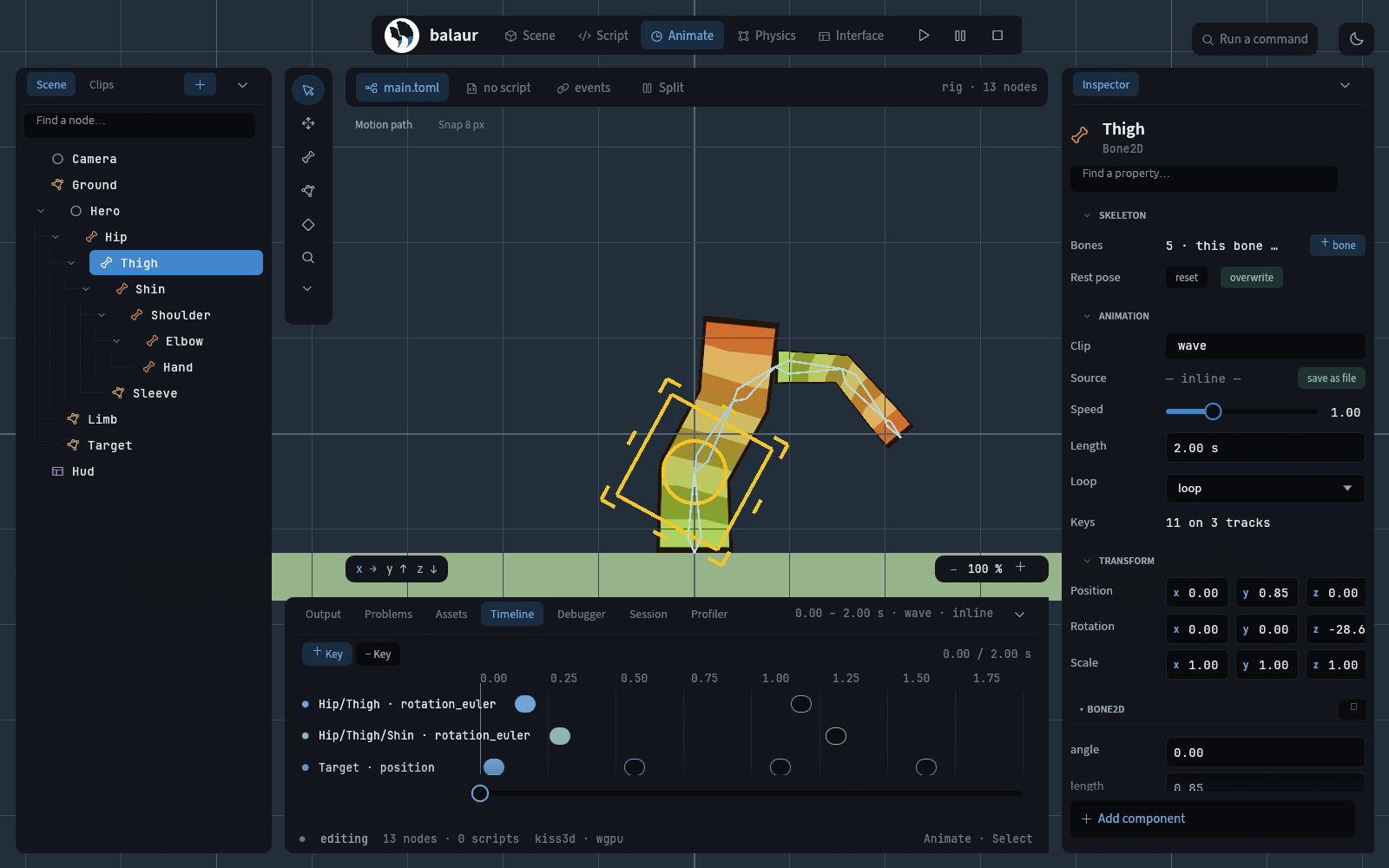
The Animate persona arranges the tree, the viewport and the timeline around one job.
Bone tool
Place bones in the viewport; each is a node in the tree with a rest pose to return to.
Polygon tool
Points, Polygons, UV and Weights modes: draw the skin, then paint how much each bone moves each vertex.
Timeline dock
Scrub, pose, key. Keys show per track; play the clip in the editor without leaving the scene.
Next to Spine
Spine is the standard 2D skeletal animator; this is where Balaur stands next to it, honestly.
Rig something.
examples/rig is one figure — a skinned leg on a clip, an arm on two-bone IK. Open it and move the target.